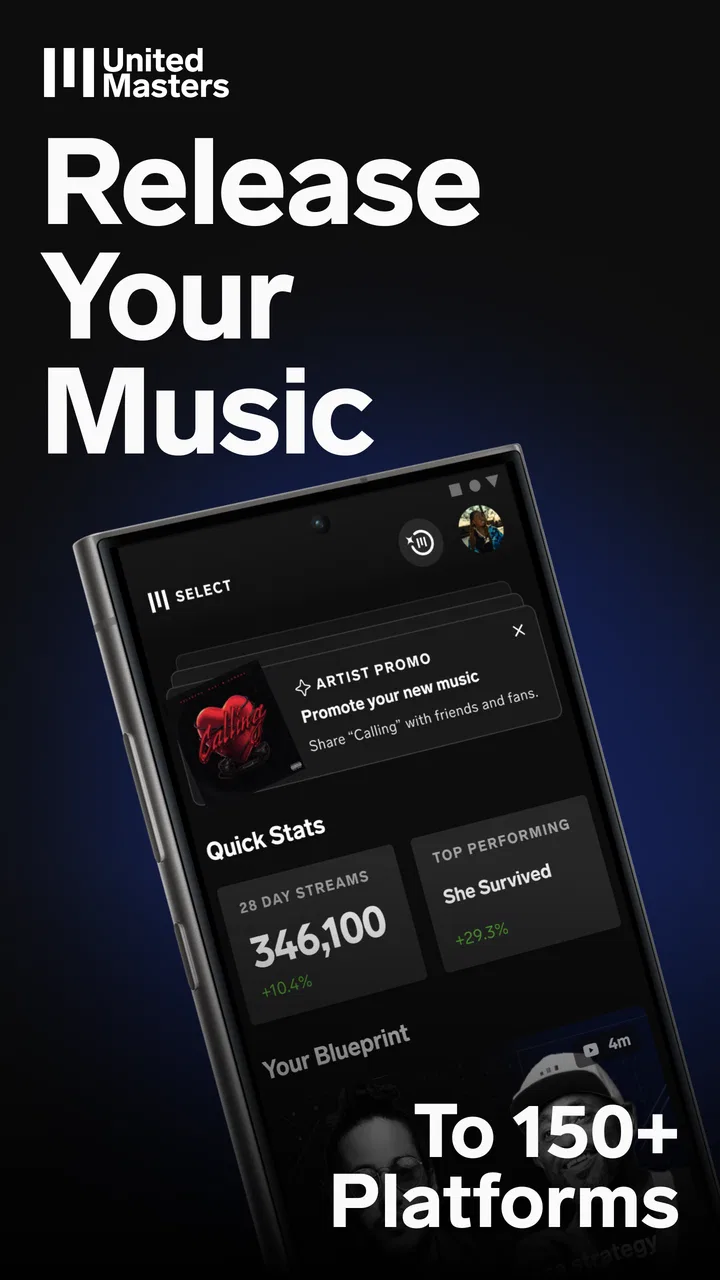
UnitedMasters: Release Music
- 4.5
- Rating
- 1.00M
- Installs
- Free
- Price

 Analysis by App-foxy
I approached UnitedMasters as a working music maker rather than as a casual streaming listener, and that distinction matters. This is a Music & Audio app from UnitedMasters built around getting original tracks ready for release, improving their sound, and helping artists discover fresh beats. I found its strongest appeal in the space between making a song at home and trying to build a serious release routine: it is more focused than a simple audio player, but it is not a complete replacement for a full desktop studio.
The app is free to install, carries an Everyone age rating, and has reached over one million installs. Its average score sits at 4.5 from around seventeen thousand ratings, with roughly two thousand written reviews. Those figures suggest a healthy audience, but they do not tell me whether it will suit every artist. The real question is what you need after recording a song: a place to distribute it, a way to improve a finished track, inspiration for the next one, or all three in one mobile workflow.
How UnitedMasters fits into a real music-making workflow
What I like about this app’s identity is that it treats release preparation as part of the creative process. Many music apps concentrate on recording, beat-making, or playback. UnitedMasters is aimed at the point where a creator has something worth sharing and needs a practical path toward putting it in front of listeners. That makes it particularly relevant to independent artists who do not want their first step to involve a complicated label-style setup.
You May Also Like

 Blood Strike: 2.5 Anniversary
Blood Strike’s Loadouts Turn Every Drop Into a Tactical Gamble
A close look at Blood Strike’s custom loadouts: how fast access to signature weapons reshapes its battle royale rhythm, rewards preparation, and narrows the gap between fights.

 Pandora - Music & Podcasts
Pandora’s Music Is Easy to Start, but Harder to Recover
Pandora’s strength is its low-effort path from a seed to a station. Its weak spot is how much confidence it asks you to place in connection, setup, and quiet recovery.

 8 Ball Pool
 Is Built on Rivalries, Rematches, and Routine
A close look at the rivalries, rematches, shared routines, and unanswered safety questions that turn a quick pool match into a persistent mobile community.

 Samsung Music
’s Quiet Strength Is Playing What You Already Own
Its reach comes less from spectacle than from dependable access to a personal library. That simplicity is both the app’s strongest retention engine and its ceiling.

 AccuWeather: Weather Radar
AccuWeather Review: A Quick, Clear Forecast for Everyday Decisions
For everyday plans, the best forecast is the one you can understand quickly. AccuWeather makes rain timing, radar, and local conditions easy to act on, with a few trade-offs.

 Hill Climb Racing
Why Hill Climb Racing Still Turns Crashes Into One More Run
A tiny car, a bumpy hill and one more upgrade: Hill Climb Racing keeps resurfacing because its simple chaos makes every near-miss feel personal.
More From Our News Desk



I would not open it expecting a traditional digital audio workstation with the depth of a desktop production suite. Its value is more focused. You can think of it as a release-oriented companion: a place to organize the move from a finished idea toward a public track, while also giving you access to audio processing and beat discovery. That combination is useful because independent artists often switch between creative and administrative tasks in the same session.
In everyday use, I can imagine a workflow like this: I finish a vocal take and instrumental on another tool, check the track through UnitedMasters, work on the final audio presentation, and then prepare it for distribution. Later, when I am stuck on a new idea, I browse beats for a different direction. The important insight is that the app can sit at several points in the process, but it does not remove the need for good songwriting, clean recording, or careful listening before release.
What the free starting point really means
The free price is a meaningful advantage for someone testing an independent music path. I can install the app without committing money at the outset, explore its general workflow, and decide whether it fits the way I already make music. That lowers the barrier for a new artist who may not yet know whether regular releases are a serious goal or simply an experiment.
There are in-app purchases ranging from $0.99 to $59.99 per item. I would treat that range as a reason to inspect each purchase carefully before paying, rather than assuming that every useful part of the experience is included in the free access. The free entry point and the paid options are separate questions: downloading the app costs nothing, while some choices inside it can carry a charge.
That distinction is especially important for artists working with a tight budget. A free app can still become expensive if a creator buys features impulsively or pays before understanding how they fit into a release plan. My practical advice is to begin with one complete song workflow, note which steps are available without payment, and only then decide whether a paid item solves a real problem for you.
I also would not judge the app solely by the highest possible purchase. The useful comparison is between what you can accomplish at no cost and the specific improvement a paid option would provide. If the free experience already helps you prepare and organize your next release, it may be worthwhile as a starting tool. If your main need is advanced production control, paying inside this app may not be the best use of your budget compared with investing in a dedicated production application.
Audio mastering is useful, but it is not a substitute for a mix
The mastering side is one of the most attractive parts for creators who can write and record but do not have much experience with final audio preparation. A finished mix can sound acceptable on headphones and still feel unbalanced elsewhere. Having a mobile route for polishing a track may help an artist hear the song in a more release-minded way instead of treating the first export as final.
There is a trade-off, though. Mastering cannot repair every problem created earlier in the chain. Distorted recording, buried vocals, harsh high frequencies, excessive bass, or a crowded arrangement usually need to be fixed in the mix itself. I would therefore use the app after making the strongest mix I can, not as a rescue button for a rough demo.
One practical habit makes a difference: I would compare the processed version with the original at matched listening levels. A louder result can seem better even when it has lost balance or detail. I would also check the track on more than one listening setup before releasing it. That workflow turns the mastering feature into a quality-control step rather than an automatic approval stamp.
Another non-obvious benefit is psychological. A mastering stage can create a useful pause between finishing a song and publishing it. That pause gives me a chance to catch an overlong intro, a vocal that disappears in the chorus, or an ending that feels abrupt. The app cannot make those artistic decisions for me, but its position near the release stage encourages a more deliberate final listen.
Beat discovery is best used as a creative tool
The beat-discovery element gives the app a second role beyond distribution and final audio preparation. I see it as most valuable when I want to break out of a familiar writing pattern. Instead of opening the same project and forcing another verse, I can use a different beat as a prompt for a new cadence, subject, or vocal texture.
I would be careful not to treat every discovered beat as automatically suitable for release. Inspiration and release readiness are different things. Before building a song around a beat, I would pay attention to the terms attached to using it and make sure the intended use matches my plans. This is one of the places where a creator should slow down rather than assume that finding a beat means every commercial or distribution possibility is settled.
A useful workflow is to save short creative notes while browsing: the tempo feel, the mood, the vocal approach, and the strongest section. That prevents beat discovery from becoming endless scrolling. I can then return to the most promising ideas with a clear purpose, rather than collecting material I never turn into songs.
For a beginner, this feature may also reveal an important truth about personal style. If I keep choosing beats with similar rhythms or moods, that pattern can become a starting point for developing a recognizable sound. If I choose beats only because they are immediately catchy, I may end up writing songs that feel interchangeable. The app can provide prompts, but artistic identity still comes from the choices made after the prompt.
Where it differs from familiar alternatives
Compared with a streaming music app, UnitedMasters is aimed at creators rather than listeners. A streaming service is better when I want a huge listening library, playlists, or background music. This app makes more sense when my goal is to move my own work toward release and find material that can influence the next track.
Compared with a mobile recording or beat-making workstation, it appears more useful at the release end of the process. A production app is the better choice when I need detailed MIDI editing, layered arrangement work, deep effects routing, or precise recording control. I would make the song in the tool that gives me the best creative control, then use UnitedMasters where its release-oriented workflow adds value.
Compared with handling distribution entirely through a desktop service, the mobile approach is convenient for artists who make decisions away from a studio. I can review a track, think through a release task, or explore a new beat without sitting at a computer. The compromise is that a phone screen and mobile workflow may feel less comfortable for detailed comparison, file management, and long editing sessions.
This makes the app complementary rather than universally superior. I would not replace every other music tool with it. I would use it when its particular combination of distribution, audio finishing, and beat discovery fills a gap in my existing setup.
Small workflow decisions that improve the experience
My first recommendation is to separate creative approval from technical approval. I would listen once for whether the song communicates what I intended, then listen again for vocal balance, unwanted noise, harshness, and low-end buildup. Combining both judgments in one distracted session makes it easy to approve a technically polished track that still does not connect emotionally.
My second recommendation is to keep an unprocessed master alongside any version prepared through the app. That gives me a reference if I later want to change the mix or compare another finishing approach. It also prevents a single processing pass from becoming the only copy of the song I can access.
Third, I would create a release checklist outside my memory. It could include the final title, artist name, artwork readiness, credits, lyrics if needed, and a last listen on ordinary speakers. The app can support a release workflow, but a checklist protects against the human errors that happen when excitement takes over at the end of a project.
Fourth, I would use beat discovery in timed sessions. Ten focused minutes looking for a specific mood is more productive than browsing indefinitely. I would keep only ideas that immediately suggest a hook, verse angle, or vocal rhythm. This turns the feature into a writing exercise instead of a distraction.
Who will get the most value from it
I think the best match is an independent artist who already has songs in progress and wants a simpler path toward releasing them. That person may not need a full label infrastructure, but does need help thinking beyond the recording stage. The app is also a sensible starting point for a beginner who wants to understand the release side of music without paying before trying the basic workflow.
It can be useful for vocalists, rappers, producers who want to share their own work, and small creator teams that need a mobile-centered way to keep projects moving. Someone who travels frequently may appreciate being able to handle release-related tasks away from a desktop. A songwriter looking for new production directions may also find the beat area more valuable than a static library of sounds.
The app is less suitable for a listener who only wants to play music. It is also not my first choice for an engineer who needs detailed control over every mastering decision, or for a producer whose main requirement is a deep arrangement environment. In those cases, a dedicated workstation or specialist audio tool is likely to offer more control for the money.
I would also ask whether I actually plan to release music. If I only record occasional demos for personal use, the distribution focus may be more than I need. The app becomes more compelling when I have a repeatable intention to finish songs, review them critically, and put them in front of an audience.
Device expectations and practical commitment
The app supports Android devices running version 8.0 or later, which covers a broad range of phones. Even so, I would prefer a reasonably capable device for audio work and keep enough free storage for project files and exports. A phone that struggles with general multitasking can make any creative workflow feel unnecessarily frustrating, regardless of the app’s design.
The current version is 26.8.1, so I would keep the app updated when possible, especially if I depend on it for release tasks. Updates are not a reason to assume that every workflow will feel identical over time, though. Before an important launch, I would avoid making last-minute changes without listening through the full process again.
Because the app is rated for Everyone, it is approachable from an age-rating perspective. That does not remove the need for adult judgment around purchases, release decisions, and the rights connected with music used in a project. Younger creators in particular should understand what they are paying for and involve a trusted adult when a purchase or formal release decision is involved.
My verdict on free access and paid value
My view is positive, but deliberately specific: UnitedMasters is worth trying if you are an independent artist who needs help turning finished music into a more organized release process. The free starting point gives you room to test that fit without an upfront app price. The paid items may add value for some creators, but I would evaluate them only against a clear need and a realistic release plan.
I would download it for the combination of distribution support, audio finishing, and beat discovery, not because I expect it to replace a complete studio. Its strongest role is as a bridge between making a track and taking responsibility for what happens next. That bridge is especially useful for artists who have good ideas but tend to stop once the recording is finished.
I would skip it if my priority is advanced production editing, if I only want to listen to music, or if I am not planning to release anything. In those situations, a dedicated workstation, a listening app, or no additional tool at all may be the better decision. For the independent creator willing to manage the final details carefully, however, the free entry point makes experimentation low-risk, while the real value comes from using the app as part of a disciplined release workflow.
After using it in that way, I see UnitedMasters as a practical companion rather than a magic shortcut. It can help me move a song forward, make a more informed final listen, and find ideas when my writing stalls. It cannot decide whether a track deserves release, replace thoughtful mixing, or guarantee that a beat fits my plans. If I understand those boundaries, I can get meaningful value from it without expecting it to do the work that still belongs to me.
FAQs for UnitedMasters: Release Music
01What is UnitedMasters: Release Music used for?
UnitedMasters: Release Music is designed for independent artists who want to distribute their songs to major streaming platforms without relying on a traditional record label. From the app, you can manage releases, review performance information, access artist tools, and keep track of your music career. It is especially useful for creators who want more control over their catalog and audience relationships.
02Can I release my music on Spotify, Apple Music, and other platforms with UnitedMasters?
Yes, UnitedMasters is built to help independent musicians distribute their tracks across popular digital services, which may include platforms such as Spotify, Apple Music, YouTube, and other supported stores. Availability can depend on your plan, territory, and the type of release. Before submitting music, check the current distribution list, delivery requirements, and any restrictions shown in the app.
03Is UnitedMasters: Release Music free to download and use?
The application may be available to download at no cost, but some of its distribution features, promotional tools, and artist benefits can depend on the membership plan you choose. UnitedMasters has offered different tiers over time, so pricing, commission policies, and included features may change. Review the current terms carefully before releasing music or selecting a paid subscription.
04What do I need to submit a song through UnitedMasters?
Before submitting a release, you generally need finished audio files, accurate song and artist information, cover artwork that follows the platform’s specifications, and confirmation that you own or control the necessary rights. You should also verify songwriter credits, featured artists, samples, and lyrics where applicable. Incorrect metadata or unauthorized material can delay approval or cause a release to be rejected.
05Is UnitedMasters suitable for beginners and independent artists?
UnitedMasters can be a practical option for beginners because it combines music distribution with tools intended to help artists build an audience and understand their performance. The interface is aimed at creators rather than industry professionals, although new users still need to learn about royalties, copyrights, release scheduling, and marketing. Artists seeking complete label services or extensive personal support may need additional resources.
Pros
- Simple tools for distributing music to major streaming platforms.
- Keeps artists informed with release and earnings updates.
- Useful analytics help track audience growth and song performance.
- Designed for independent artists without requiring a traditional label.
- Offers promotional opportunities and artist-focused resources.
Cons
- Some features and benefits may require a paid subscription or extra fees.
- Revenue and reporting details can take time to appear after a release.
- Support options may be limited for users needing immediate assistance.
- Eligibility requirements can restrict access to certain platform features.
- Results depend heavily on the artist’s own promotion and audience building.

UnitedMasters: Release Music
Gallery